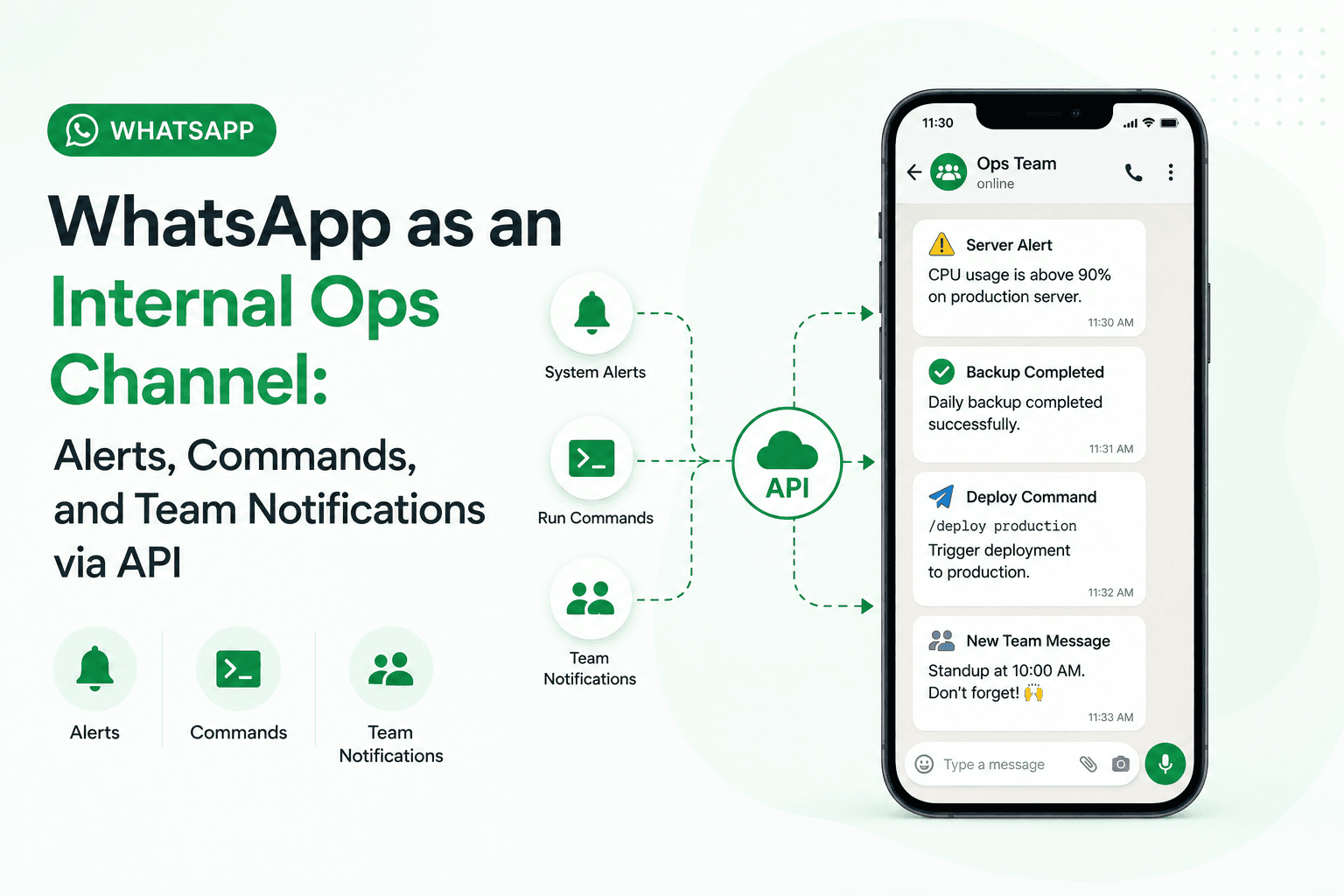
WhatsApp as an Internal Ops Channel: Alerts, Commands, and Team Notifications via API
WhatsApp is the highest-attention notification channel available to businesses and development teams. The Chatmaid API makes it accessible with a flat $7.99/month and a single API call — no Meta business account, no template approvals, no per-message billing. The use cases above range from 30-minute integrations (deployment notifications) to more sophisticated command-response systems. All run on the same API. Start building: developers.chatmaid.net/signup
Email notifications go unread. Slack has 30 channels and most developers have it muted. PagerDuty wakes people up for P2 incidents that could wait until morning.
WhatsApp is different. People actually look at it — it's the same app they use to talk to family and friends. A WhatsApp message at 2am gets seen. A critical alert that arrives while someone is in a meeting gets noticed.
This makes WhatsApp an underutilized channel for internal operations: deployment notifications, server alerts, sales pipeline updates, daily digests, and command-response interfaces for actions your team needs to trigger remotely.
With the Chatmaid API, you can wire up any of these patterns in under an hour.
Use Cases
1. Deployment Notifications
Send a WhatsApp message to the engineering team channel every time a deployment succeeds or fails.
bash
# Add to your CI/CD pipeline (GitHub Actions, GitLab CI, etc.) curl -X POST https://developers-api.chatmaid.net/v1/messages/send \ -H "Authorization: Bearer $CHATMAID_API_KEY" \ -H "Content-Type: application/json" \ -d "{ \"fromPhoneId\": \"$SENDER_PHONE\", \"to\": \"$TEAM_PHONE\", \"content\": \"✅ Deployed main → production\\nCommit: ${COMMIT_SHA:0:7}\\nBy: $GITHUB_ACTOR\\nTime: $(date -u)\" }"
For failures:
bash
-d "{ \"content\": \"🚨 Deployment FAILED\\nBranch: $BRANCH\\nError: Build step failed at step 3 (tests)\\nLog: $PIPELINE_URL\" }"
Your team sees deployment status on WhatsApp in real time, without needing to check the CI dashboard.
2. Server and Application Monitoring
Connect your monitoring stack (Datadog, Grafana, UptimeRobot, custom scripts) to WhatsApp.
Python example — server health check:
python
import requests import psutil def check_and_alert(): cpu = psutil.cpu_percent(interval=1) memory = psutil.virtual_memory().percent disk = psutil.disk_usage('/').percent alerts = [] if cpu > 90: alerts.append(f"🔴 CPU: {cpu}%") if memory > 85: alerts.append(f"🟡 Memory: {memory}%") if disk > 90: alerts.append(f"🔴 Disk: {disk}%") if alerts: message = "⚠️ Server Alert — prod-01\n" + "\n".join(alerts) requests.post( "https://developers-api.chatmaid.net/v1/messages/send", headers={"Authorization": "Bearer sk_live_xxx"}, json={ "fromPhoneId": "+15551234567", "to": "+15559876543", # On-call engineer "content": message } ) # Run every 5 minutes via cron check_and_alert()
3. Sales Pipeline Updates
Send your sales team daily WhatsApp digests with CRM data — deals closed, pipeline value, follow-ups due.
python
import requests from datetime import date def send_daily_sales_digest(team_phone: str, api_key: str, crm_data: dict): message = f"""📊 Sales Digest — {date.today().strftime('%b %d')} New leads today: {crm_data['new_leads']} Deals closed: {crm_data['closed']} Revenue today: ${crm_data['revenue']:,.0f} Follow-ups due: {crm_data['followups_due']} Pipeline (30d): ${crm_data['pipeline']:,.0f} Top deal: {crm_data['top_deal_name']} (${crm_data['top_deal_value']:,.0f})""" requests.post( "https://developers-api.chatmaid.net/v1/messages/send", headers={"Authorization": f"Bearer {api_key}"}, json={ "fromPhoneId": "+15551234567", "to": team_phone, "content": message } )
Schedule with a cron job or n8n schedule trigger to send every morning at 9am.
4. WhatsApp as a Command Interface
This is the most powerful pattern. Your team can send commands to a WhatsApp number and your backend executes them.
Example: an infrastructure number that accepts commands from authorized engineers.
python
from flask import Flask, request, jsonify import subprocess app = Flask(__name__) AUTHORIZED_PHONES = ["+15551112222", "+15553334444"] COMMANDS = { "RESTART nginx": "sudo systemctl restart nginx", "STATUS": "systemctl status nginx mysql redis", "DEPLOY": "cd /app && git pull && docker-compose up -d" } @app.route('/webhook/ops', methods=['POST']) def ops_webhook(): data = request.json if data['event'] != 'message.received': return jsonify({}), 200 sender = data['data']['from'] command = data['data']['content'].strip().upper() # Security: only accept from authorized engineers if sender not in AUTHORIZED_PHONES: send_whatsapp(sender, "Unauthorized.") return jsonify({}), 200 if command in COMMANDS: result = subprocess.run( COMMANDS[command], shell=True, capture_output=True, text=True, timeout=30 ) reply = f"✅ Executed: {command}\n\n{result.stdout[:500]}" else: reply = f"Unknown command. Available: {', '.join(COMMANDS.keys())}" send_whatsapp(sender, reply) return jsonify({}), 200
Your engineers send "RESTART nginx" to the WhatsApp number and get a confirmation within seconds — from anywhere, without VPN access to your dashboard.
5. E-Commerce Order Notifications
Trigger WhatsApp messages from your e-commerce platform when orders are placed, shipped, or delivered.
javascript
// Shopify webhook handler app.post('/webhooks/orders/fulfilled', async (req, res) => { const order = req.body; const customerPhone = order.shipping_address?.phone; if (!customerPhone) { return res.status(200).json({}); } const message = `Hi ${order.shipping_address.first_name}! 📦 Your order #${order.order_number} has shipped! Items: ${order.line_items.map(i => i.name).join(', ')} Tracking: ${order.fulfillments[0]?.tracking_number || 'Coming soon'} Carrier: ${order.fulfillments[0]?.tracking_company || 'Standard shipping'} Questions? Just reply to this message.`; await fetch('https://developers-api.chatmaid.net/v1/messages/send', { method: 'POST', headers: { 'Authorization': `Bearer ${process.env.CHATMAID_KEY}`, 'Content-Type': 'application/json' }, body: JSON.stringify({ fromPhoneId: process.env.SENDER_PHONE, to: customerPhone, content: message }) }); res.status(200).json({}); });
6. Appointment Reminders
Send WhatsApp reminders 24 hours and 1 hour before scheduled appointments.
python
import schedule import time from datetime import datetime, timedelta def check_upcoming_appointments(): # Query your calendar/booking system appointments = get_appointments_in_next_hour() for appt in appointments: send_whatsapp( appt['client_phone'], f"⏰ Reminder: Your appointment is in 1 hour!\n\n" f"📅 {appt['datetime'].strftime('%B %d at %I:%M %p')}\n" f"📍 {appt['location']}\n\n" f"Need to reschedule? Reply here." ) schedule.every().hour.do(check_upcoming_appointments) while True: schedule.run_pending() time.sleep(60)
Multi-Number Routing
For larger teams, connect multiple phone numbers to Chatmaid and route notifications to the right one:
+1 (305) xxx-xxxx— Engineering alerts+1 (786) xxx-xxxx— Sales team notifications+1 (954) xxx-xxxx— Customer support channel
Each number is $2.99/month additional. Route messages by department, severity, or team — all from a single API key.
Idempotency for Retry Safety
In production systems, you might trigger the same notification multiple times due to retries or race conditions. Chatmaid supports idempotency keys:
bash
curl -X POST https://developers-api.chatmaid.net/v1/messages/send \ -H "Authorization: Bearer sk_live_xxx" \ -H "Idempotency-Key: deploy-main-2026-06-01-03a7f2" \ -H "Content-Type: application/json" \ -d '{ "fromPhoneId": "...", "to": "...", "content": "..." }'
Send the same request multiple times with the same idempotency key and it'll only deliver once. Essential for webhook-triggered workflows.